

Tobo Wireless HDMI Transmitter and Receiver kit, Full HD 4K Presentation Equipment Adapter, Plug Play Streaming Media. Laptop, dongle, PC,PS4, Smart Phone to HDTV/Projector, TX*1+RX*1-Black
 RP GROUPS


Price: ₹19,999 - ₹9,480.00
(as of Mar 08, 2026 18:08:41 UTC – Details)
Product Description


1.Stream all you want to a big screen.Watching movies or playing big screen games with family,so gorgeous!
2.Iuput Devices: Laptop, PC,Camera ,etc. Resolution: Max 4K@30HZ
3.Output Devices: HDTV, Projector ,Monitor,etc.Resolution: Max 1080P @60HZ
Warm tips:
1.The longest distance of smart phone transmission is 3-5m(16ft).
2.When using,pls make sure TX’s power supply has sufficient power.
3.When using, pls don’t go through the wall, it will weaken the transmission signal.
4.Pls don’t use it in closed closet,or the receiver will not be able to link with the transmitter.
5.Please read the instructions carefully before use.

1. Allows wireless transmission and extension of audio/video signals up to 164FT (50M) in an open environment, with only 0.1S latency, supporting all the APPs you know and love :)
2. Warm tips:
Our TX (transmitter) has an hdmi port ,if you want to connect the video camera directly, pls make sure the video camera has an hdmi port, or you need an adapter,such as a mini hdmi to hdmi adapter or a micro hdmi to hdmi adapter. Thanks !

Not only can stream all you want to a big screen, but also can browse other pages on your laptop while casting the video. So stunning!
How to switch the resolusion to 4K?
Apple phone/tablet:
STEP 1: Connect device to the WIFI of Receiver(name is “RX-XXXX” and default password is”12345678″).
STEP 2: Open the internet browser of phone/tablet, enter the “192.168.203.1”
STEP 3: Go to setting and click on “resolusion”, select “3840 * 2160”.
Android phone/tablet:
STEP 1: Connect device to the WIFI of Receiver(name is “RX-XXXX” and default password is”12345678″).
STEP 2: Open the internet browser of phone/tablet, enter the “192.168.203.1”
STEP 3: Go to setting and click on “resolusion”, select “3840 * 2160 30P”.

How to connect to the smartphones and tablets?
Apple phone/tablet:
STEP 1: Connect device to the WIFI of Receiver(name is “RX-XXXX” and default password is”12345678″).
STEP 2: Slide down the screen to enter the Apple Device Control Center, click “Screen Mirroring”, and select the MiraSreen devices.
Android phone/tablet:
STEP 1: Connect device to the the WIFI of Receiver(name is “RX-XXXX” and default password is”12345678″).
STEP 2: Turn on the wireless mirroring function in the phone’s settings, different bands of phones may have different ways.
STEP 3: Search for and connect to the MiraScreen devices.

2 Power Modes for TX:
Mode 1: Take power from the HDMI port of the laptop.
Mode 2: If the laptop HDMI doesn’t support power supply,we can use the Type-C port cable to connect the power supply.
Power supply sequence: Type-C power supply first, and then connect to the HDMI port of the laptop or computer.
Installations:
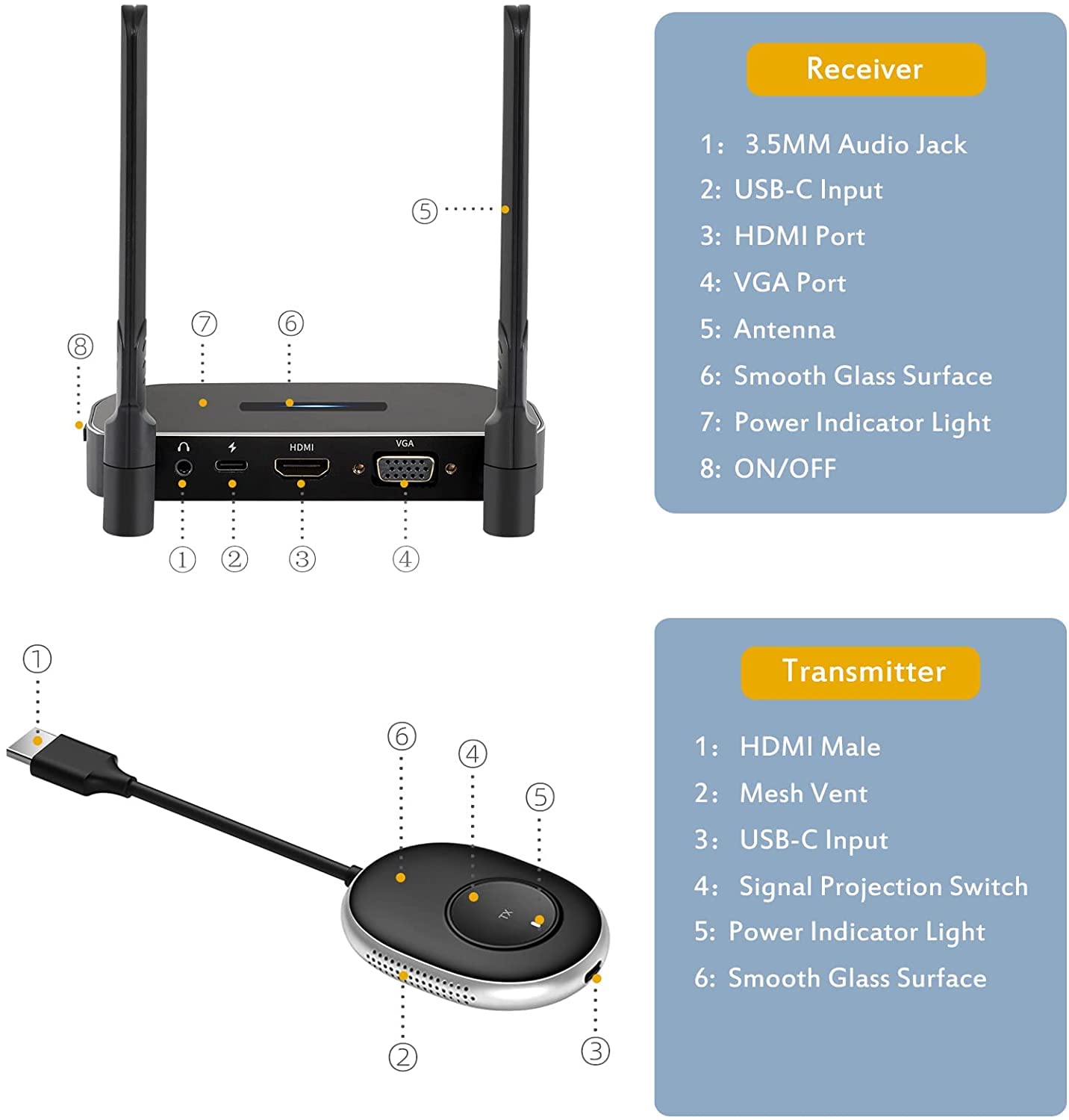
1. Connect the HD port or VGA port of the receiver to the video input port of the display device such as the monitor or TV.
2. Connect the USB-C power supply port of the receiver to the charging cable and plug it into the power adapter (5V2A).
3. Turn on the receiver power switch.
4. Adjust the HD Signal source of the monitor or TV to the corresponding HD port until the boot screen is displayed.
5. Connect the transmitter to the computer or other devices With HD video output function . After the indicator Light enters the fast flash state ,
wait for ten secs to complete Casting.
Reset and Re-pair:

Please connect the receiver to the device and power supply before re-pairing. Insert the thimble into the small hole at the bottom for 3-5 seconds.

Then “Ready to Pair” will appear on the display, which means the receiver has entered re-pairing mode.

Press and hold the button on the transmitter for 3-5 seconds until the indicator light flashes quickly and “Pairing…” will appear on the display

Wait for about 20s, when the screen displays “pairing OK” and the indicator light of the transmitter turns on, it means the connection has been successful.
【4K ULTRA HD RESOLUTION】 wireless hdmi transmitter and receiver supports video resolution up to 4K(3840 X 2160-30@hz) and more resolutions(1080P full HD/720P),Built-in chip can prevent delay and lag caused by signal interference, you can enjoy clear and vivid images in a large screen. This Mirroring Dongle is perfect for learning, business meeting, family party and playing games and gives you a great screen experience.
【POWERFUL FUNCTION】Wireless HDMI adapters support stream HD 4K 3D movies, TV shows, video, games, presentations wirelessly from your Laptop, PC, Mac, Smartphone, PS4/5, Switch, Satellite Box, HDSLR Camera to HDTV, Projector or Monitor.
【PLUG & PLAY】No drive or APP needed, without messy wires, it’s easy to connect and pair TV and will not affect other wireless devices, Wirelessly mirror and share all contents on the big screen, include: pictures, videos, online game, online movies, web browsing, online shopping, documents and more.
【HIGH QUALITY TRANSMISSION】In an open field, The distance of the wireless transmission high-definition HDMI audio/video signals is as high as 328ft/100m. if through 1 wall the signal can transmit 10-30m/33ft-100ft. transmission distance is enough to cover the entire conference room or room in the home, , This means you don’t have to buy a long HDMI cable to extend video signals.
【LNSTRUCTIONS FOR USE】Please use the 5V2A adapter to connect the transmitter: 1. When your computer battery is low, 2. The HDMI input current of some computers is low, and the power light of the transmitter will become weak or go out. 3. The power supply of the USB interface provided by the TV is less than 5V1A. If you do not use the charger to connect the transmitter and receiver, there may be an interruption during use.